

Could an unresponsive smart-home device be a setup or connectivity issue rather than a reason to replace the whole system? When lights, climate controls or other connected devices stop responding, it’s understandable to want a quick fix. The cause could be electrical, network-related or specific to one device. If you’re searching for home automation system repair Abu Dhabi, start with diagnosis, not assumptions. Some faults stem from software or configuration and may be resolved without replacing hardware.
This guide explains how to identify common fault patterns and what information to gather before arranging an assessment. You’ll learn how to compare troubleshooting, repair and replacement options, check whether a provider can support your existing system, and clarify the work scope before approving it. We’ll also cover what to ask about parts, compatibility, costs and post-repair support. Before work is considered complete, request clear testing of the affected controls and devices so you know what was checked and whether follow-up may be needed.
Key Takeaways
- Record which controls or routines are affected, when the issue occurs, and any recent changes to help narrow down the assessment.
- Consider possible network, power, configuration, cabling and device faults before deciding what work is needed.
- For home automation system repair Abu Dhabi, confirm that the provider supports your existing system and can source compatible parts before approving work.
- Compare targeted repair, component replacement and broader renewal based on the fault, future support and your requirements.
- Agree on the work scope, exclusions, approval points and how affected functions will be tested and handed over.
Home Automation System Repair in Abu Dhabi: Recognize the Fault Before It Spreads
A control panel may stop responding, a connected device may drop offline, or a programmed routine may fail to run. These symptoms are frustrating, but they don’t point to one cause by themselves. A device that appears offline could have a local power issue, a network interruption, a configuration problem or a fault elsewhere in the system. The Home automation system overview describes how connected functions such as lighting, climate control and security can work together. That’s why one visible symptom may call for broader checks.
Home automation repair means diagnosing a fault and restoring affected functions in a connected system. The aim is to establish what has stopped working and why before deciding whether troubleshooting, repair or replacement is appropriate. Describe the symptoms clearly, and don’t treat an intermittent fault as a confirmed diagnosis.
Which home automation problems may need professional assessment?
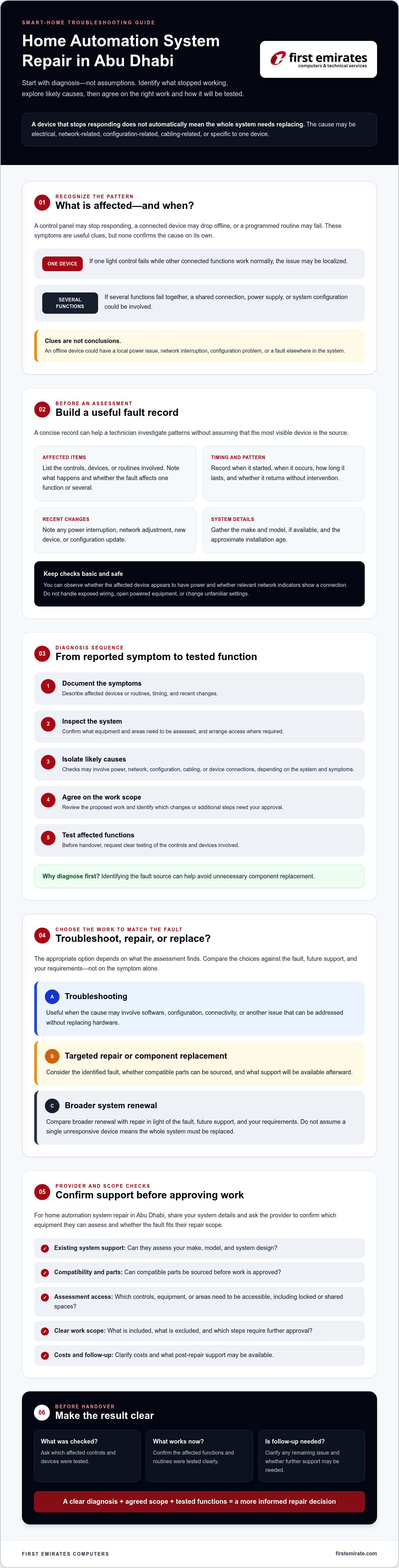
Arrange an assessment if controls repeatedly fail to respond, routines stop running as intended or connected devices disconnect. First consider whether the issue affects one device or several functions. If one light control fails while other connected functions work normally, the problem may be localized. If several functions fail together, the cause could involve a shared connection, power supply or system configuration. These are useful clues, not conclusions.
Record intermittent faults rather than relying on memory. Note the affected device or routine, when the issue occurs, how long it lasts and whether it returns without intervention. Also record recent changes, such as a power interruption, network adjustment, new device or configuration update. This timeline can help a technician investigate patterns without assuming the most visible device is the source.
What should you check before requesting a repair?
Make only basic observations that are safe and accessible. Check whether the affected device appears to have power and whether relevant network indicators show a connection. Avoid handling exposed wiring or equipment that would need to be opened. Don’t open powered equipment or change unfamiliar settings, as this can create safety risks or make the original fault harder to assess.
Before contacting a provider, gather:
- System make and model, if available, and approximate installation age.
- The affected controls, devices or routines, with examples of what happens.
- When the problem started and any recent power, network, device or configuration changes.
Share these details before assuming a provider supports your system. Ask them to confirm which equipment they can assess and whether the fault falls within their repair scope.
How Home Automation System Diagnosis Works in Abu Dhabi
A sound diagnosis follows a sequence: document the symptoms, inspect the system, isolate likely causes, agree on the proposed scope, then test the affected functions. This helps prevent a quick assumption, such as blaming the internet because a device is offline, from leading to the wrong work. Identifying the fault source can help avoid unnecessary component replacement.
Different causes call for different checks. A power issue may affect equipment locally, while a network fault can interrupt communication between connected components. Configuration problems may disrupt a routine even when its devices are powered. A cabling or device fault requires a different inspection. The technician may need system details, access to relevant controls and permission to inspect equipment or areas connected to the fault. Confirm access arrangements in advance, particularly if equipment is in a locked room or shared area.
How technicians narrow down the fault source
The first distinction is scope: does the problem affect one device, one function or several parts of the system? Based on the symptoms and system design, a technician can check relevant power, network, configuration, cabling or device connections. Connectivity checks may include the local network and related ELV infrastructure, such as structured cabling where relevant. Diagnostic tools and procedures depend on the system, so ask the provider to confirm what they can assess instead of assuming compatibility.
For home automation system repair Abu Dhabi, a useful assessment should connect the reported symptoms to the checks performed and explain what those checks indicate. Before repair or replacement begins, ask the provider to describe the proposed work and identify any steps that would need further approval if the findings change the scope. The UAE consumer protection law information portal is a reference for understanding consumer rights. Check the relevant guidance for your circumstances.
What information helps an Abu Dhabi service visit?
Good preparation gives the technician a clearer starting point. Share photographs of the control panel or affected equipment, exact error messages, available system documentation and a concise fault timeline. Include which functions are affected and whether the issue is constant or intermittent. If you’re comparing system options or reviewing what was installed, the Abu Dhabi Home Automation: 2026 Selection Guide may provide useful background.
For an on-site assessment, arrange access to affected rooms and relevant control equipment, and confirm who can provide permission to inspect them. First Emirates Computers lists home automation and ELV project implementation among its capabilities. Confirm repair scope and system compatibility in advance. To help establish whether an assessment is relevant, share your system details and fault description.
Repair or Replace a Home Automation System? Compare the Options
A fault affecting several functions can make the whole setup seem unusable, but it doesn’t prove that every component has failed. A shared connection or a single central component may be involved. The right choice depends on the assessment findings, whether compatible parts are available and how well the existing system meets your needs.
| Option | When it may fit | What to confirm |
|---|---|---|
| Targeted repair | Evidence points to an isolated fault, while other components operate as expected. | Cause of the fault, repair scope and whether the current system can be tested afterward. |
| Component replacement | A specific device or part is faulty, unavailable for repair or no longer suitable. | Compatibility with connected equipment, parts availability and support for the replacement. |
| Broader system renewal | Faults are repeated or widespread, key components are unsupported, or the system no longer meets requirements. | Which existing components, if any, can remain, and what changes are needed for future support. |
Use the comparison as a discussion guide, not a diagnosis. Final recommendations depend on an assessment and confirmed compatibility with the installed system. Ask for the findings behind a recommendation, along with the proposed work and any exclusions, before approving it.
When a targeted repair may be appropriate
A targeted repair may suit an isolated fault when the remaining functions work correctly. Feasibility depends on understanding the system and confirming that compatible parts or repair methods are available. Keep installation records, system documentation and details of previous changes where possible. Older or third-party equipment may have limited support, so ask the provider to confirm what can be repaired before proceeding.
When replacement or an upgrade may need consideration
Repeated faults, unsupported components or changing household requirements may make replacement worth assessing. Replacing one device is different from renewing the complete system. A compatible component may address a localized issue without requiring wider changes. If automation connects with access control, include that integration in the assessment and ask how a proposed change could affect it. Compare options based on reliability needs, compatibility and the availability of future support.
For home automation system repair Abu Dhabi, ask the provider to explain whether its recommendation addresses a confirmed fault or a wider reliability concern. First Emirates Computers lists home automation among its offerings, but confirm which systems and components it can assess or repair before agreeing to work.
What to Expect from Home Automation Repair Service in Abu Dhabi
A well-managed repair process should make each decision clear, from the first enquiry to the final handover. Start by sharing the system details, affected functions and a concise description of the fault. The provider can then confirm whether the system falls within its support scope and explain what an assessment may involve. Before arranging a visit, ask about access requirements and whether diagnostics, parts or repair work are scoped separately.
After the assessment, the provider should explain the findings and proposed work before proceeding. Request a written scope that distinguishes confirmed work from any further steps that would need your approval. Once work is complete, the affected functions should be tested, and you should receive a clear handover describing what was done and any follow-up to consider.
What should a clear repair scope include?
A useful scope connects the reported symptoms to the components assessed and the proposed work. It should state what is excluded and identify uncertainties, such as compatibility or parts availability, that could affect the plan. Before approval, clarify any visit charges, repair terms, warranty details and whether replacement parts or additional work require separate approval. Terms vary by provider, so get them confirmed rather than assumed.
- Symptoms and findings: Which functions were reported, what was inspected and what the assessment established.
- Proposed work: The components involved, the expected repair or replacement, and any unresolved questions.
- Practical requirements: Parts, property access, exclusions and approval points for work beyond the agreed scope.
How should the repaired system be tested and handed over?
Testing should cover the functions affected by the repair. Ask the technician to check relevant controls, connected devices and automation routines, then explain what was tested and whether anything remains unresolved. A completed task is not the same as a confirmed result, so agree on how any function that cannot be tested during the visit will be documented.
At handover, request a plain-language summary of completed work and recommended follow-up actions. Ask for updated system notes or settings information where applicable and available. Keep these records with the original system documentation. They can help inform future maintenance or compatibility decisions.
For home automation system repair Abu Dhabi, confirm the provider’s service coverage, supported systems and repair scope before arranging work. First Emirates Computers is Abu Dhabi-based and lists home automation among its offerings, but verify specific repair capabilities and visit arrangements. Describe your system and request an assessment, then confirm whether the required support is available.
Choose a Home Automation Repair Provider in Abu Dhabi with Clear Scope
A provider’s general technology experience doesn’t automatically confirm they can work on your installed automation system. For home automation system repair Abu Dhabi, look for a clear process: the provider checks system compatibility, explains the assessment and proposed work, then confirms how affected functions will be tested and what follow-up is available. Don’t approve a repair or parts order until the provider confirms your system and components are within scope.
Use this checklist when comparing providers:
- Relevant experience: Can they assess your specific system and the components involved?
- Transparent scope: Do they explain what diagnosis includes, what is excluded and which steps need your approval?
- Testing and records: Will they check the affected functions and explain what was tested?
- Follow-up: Are post-repair support and any applicable repair terms clearly described?
Questions to ask before approving home automation work
Ask which system types and components the provider has confirmed it can support. Clarify what the diagnostic assessment covers, whether parts or additional work are separate, and how test results will be reported. If the fault may involve cabling or connectivity, ask who will assess that aspect and whether it falls within the agreed scope. Clear answers make it easier to compare proposals beyond the initial recommendation.
How First Emirates Computers may fit your repair enquiry
First Emirates Computers is based in Abu Dhabi and lists home automation and ELV project implementation among its capabilities. Its structured cabling services may also be relevant if an assessment points to a connectivity issue, but that does not confirm support for every automation brand, protocol, device or fault. Ask which parts of your system can be assessed and whether the required repair, parts and follow-up are available before arranging work.
To discuss your system, describe the affected functions, symptoms and any system details you have. Contact First Emirates Computers to discuss your system and request confirmation of assessment options and repair coverage before proceeding.
Restore Confidence with a Clear Next Step
Reliable home automation support starts with understanding the fault, not replacing equipment based on an assumption. Record what has stopped working, share the system details, and ask the provider to explain the assessment, compatibility checks, proposed scope and testing before you approve work. This gives you a clearer basis for deciding whether a targeted repair, component replacement or broader renewal fits your needs.
If you’re considering home automation system repair Abu Dhabi, First Emirates Computers may be a local point of contact to discuss your system and fault. The Abu Dhabi-based company lists home automation, ELV projects and maintenance contracts among its offerings. Confirm specific repair coverage, supported systems and assessment arrangements before proceeding.
Contact First Emirates Computers to discuss a home automation repair assessment and share the details needed to check whether your system is within scope. With clear information and documented testing, you can take a measured step toward restoring dependable operation.
Frequently Asked Questions
Can a home automation system be repaired without replacing the whole system?
Yes. A fault may be limited to one device, connection or configuration, so a full system replacement isn’t always necessary. A technician should assess the affected functions and confirm whether compatible parts and support are available. If faults are widespread or key components are unsupported, broader renewal may be worth considering. Ask for the findings and options before approving work.
What are the common signs that a home automation system needs repair?
Common signs include unresponsive controls, routines that no longer run as expected and devices that repeatedly disconnect. Note whether the issue affects one device or several functions, and record when it happens. These symptoms can have different causes, including power, network, configuration, cabling or device faults, so one visible sign alone can’t confirm the source. Seek an assessment if problems persist or recur.
How do technicians diagnose home automation problems?
Technicians typically review the fault history, inspect relevant system components and narrow down whether the issue involves power, connectivity, configuration, cabling or a device. They may compare the affected function with other parts of the system, then explain the findings and proposed scope. The checks depend on the installed system, so confirm that the provider supports it before arranging an assessment.
How much does home automation system repair cost in Abu Dhabi?
There isn’t one fixed price for home automation system repair Abu Dhabi, because costs depend on the fault, diagnostic scope, parts, access requirements and work agreed. Ask whether assessment or visit charges are separate, and request a written breakdown covering included work, exclusions, parts and approval points. Don’t assume a repair or replacement is included until the provider confirms the terms.
Can different home automation brands work together after a repair?
Sometimes, but compatibility depends on the specific devices, system design and how components communicate. A replacement from another brand may not work with existing controls or routines, even if it performs a similar function. Ask the provider to verify compatibility with your installed system before ordering parts or changing settings. Request confirmation of which functions will be tested after the repair or component change.
What should I do before a home automation technician visits?
Prepare the system make and model, approximate installation age and a short timeline describing when the fault occurs. Share clear photographs, error messages and available system documents. Note recent power, network, device or configuration changes, and arrange access to affected rooms and relevant control equipment. Check only basic, safe power or connectivity indicators. Don’t open powered equipment or change unfamiliar settings before the visit.


