

Replacing a network cable may be the wrong first step. Intermittent connectivity in a Dubai office can disrupt daily work, but the cause may be a damaged cable, a faulty port, a device issue or a configuration problem. Effective network cable fault finding Dubai businesses can rely on starts by isolating the link, not swapping components without evidence.
It’s reasonable to suspect the cable when a connection drops in and out. But replacing it without testing can waste time and leave the underlying fault unresolved. A systematic check helps narrow down where the problem is and what to investigate next.
This guide covers safe, basic checks, ways to compare a suspect connection with a known-working one, and what a simple cable tester can and can’t confirm. It also explains when recurring faults call for structured cabling diagnostics, and how basic connectivity testing differs from cable certification. You’ll have a practical process for identifying likely causes before replacing parts or arranging an assessment.
Key Takeaways
- Recognise how dropouts, slow transfers, failed links and PoE interruptions can point to a physical-link problem.
- Use a safe sequence of inspection, reseating, isolation, testing and documentation before replacing components.
- Compare symptoms across the cable, connector, switch, endpoint and configuration to narrow down the likely source.
- For network cable fault finding Dubai, prepare affected locations, device details, recent changes and test observations before requesting an assessment.
- Choose a structured cabling partner who can clarify the diagnostic scope, document findings and distinguish cabling issues from equipment problems.
Network Cable Fault Finding in Dubai: Recognise the Symptoms First
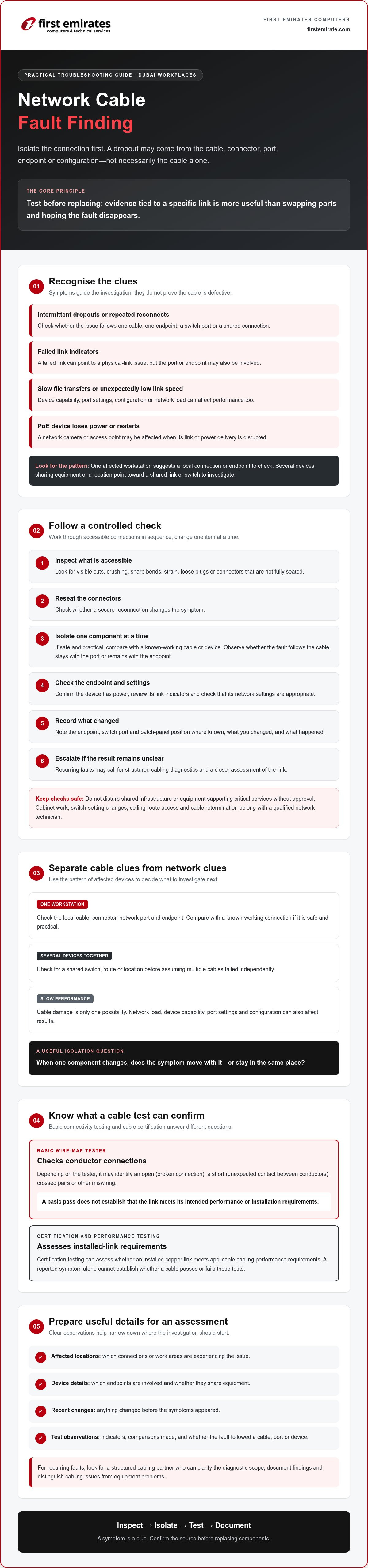
Network cable fault finding means identifying and confirming a problem in the physical link between network equipment. A cable fault is a defect or performance issue on that link. A network outage is a loss of service that may also originate in a switch, endpoint, power supply or configuration. Symptoms can guide an investigation, but they don’t prove the cable is defective.
For network cable fault finding Dubai workplaces, begin by noting which connections are affected, when the issue occurs and whether it appears to follow a particular cable or device. Intermittent dropouts, failed link indicators, slow file transfers or a device that repeatedly reconnects all justify a closer check. A Power over Ethernet (PoE) device, such as a network camera or access point, may also lose power or restart if its link or power delivery is disrupted. These signs are clues, not a diagnosis.
Which symptoms may point to a faulty Ethernet cable?
An unstable connection at one workstation may indicate a local cable, connector, network port or endpoint issue. If several devices in the same area or connected through the same equipment show problems, investigate a shared link or switch before assuming that multiple cables failed independently. A link that negotiates at an unexpectedly low speed can also warrant investigation, although device capability, port settings and configuration may affect the result.
Inspect accessible cable sections for visible damage, loose plugs or strained routes. For performance verification, remember that basic connectivity checks are not the same as certification. The overview of copper cable certification tests explains how testing can assess whether an installed copper link meets applicable cabling performance requirements. A reported symptom alone cannot establish whether a cable passes or fails those tests.
Could the problem be the device, switch port, or settings?
Check that the endpoint has power, review its link indicators and confirm that its network settings are appropriate. If it’s safe and practical, compare the connection with a known-working device or cable. Change one component at a time, then see whether the fault follows the cable, stays with the port or remains with the endpoint. This controlled comparison provides better evidence than replacing several parts at once.
If only one device is affected, check its power and settings before treating the cabling as the cause. If multiple connections fail together, note whether they share a switch, route or location. Slow performance can also result from network load or configuration, so don’t attribute it to cable damage without supporting test results. Record which checks change the symptom. That information helps determine whether to investigate the physical link or another part of the network.
How to Test a Network Cable in Dubai Before Replacing It
A controlled check can help separate a cable problem from a loose connection, faulty port or endpoint issue. For network cable fault finding Dubai businesses can follow a simple sequence: inspect, reseat, isolate, test, document and escalate if the result remains unclear. Limit checks to accessible connections. Don’t disturb shared infrastructure or equipment that supports critical services.
Test before replacing: a result tied to a specific link is more useful than swapping a cable and hoping the fault disappears.
Start with a visual check and controlled connection swap
Inspect accessible cable jackets and connectors for cuts, crushing, sharp bends, strain or plugs that aren’t fully seated. Reseat the connectors, then compare the connection with a known-good cable if it’s operationally safe. Change one item at a time so you can tell whether the symptom follows the cable, endpoint or switch port. Don’t unplug connections that may disrupt essential systems without approval.
Record the endpoint, switch port and patch-panel position, where known, along with what you changed and what happened. Users can usually check visible damage, reseat an accessible connector and report link indicators. Work inside cabinets, changes to switch settings, ceiling-route access and cable retermination should be handled by a qualified network technician.
Choose a cable tester and interpret its limits
A basic wire-map tester checks whether conductors connect in the expected order. Depending on its capabilities, it may identify an open, meaning a broken connection, a short, where conductors contact unexpectedly, crossed pairs or other miswiring. A pass on a basic test doesn’t establish that a link meets its intended performance or installation requirements. Certification and performance testing use more comprehensive methods. Check the tester’s supported cable category, test limits and applicable standard before relying on a result.
Some network equipment uses time-domain methods to estimate the location of cable problems. Virtual Cable Tester (VCT) technology provides background on how these tools can help identify issues such as opens and shorts. Results depend on the equipment and test conditions, so treat them as diagnostic evidence rather than a substitute for appropriate verification.
Before connecting a tester, follow its instructions and disconnect the link from active network equipment unless the tester is specifically designed for that test condition. In particular, don’t connect an unsuitable tester to an active PoE link. If results are inconsistent, the cable is concealed or performance remains poor despite a basic pass, stop swapping parts and arrange a structured cabling assessment. First Emirates Computers lists structured cabling design and implementation. Confirm the assessment scope and availability before arranging support.
Cable Fault or Network Issue? Isolate the Cause in a Dubai Workplace
A useful diagnosis depends on where the symptom appears and whether it moves when components are changed. One workstation losing its link calls for a different investigation than several devices disconnecting together. The table below offers starting clues, not proof. Confirm the cause through controlled checks and suitable testing.
| Possible source | Symptoms to compare | What to check |
|---|---|---|
| Cable | One link drops or performs inconsistently, especially when the cable is moved. | Compare with a known-good cable and test the affected link. |
| Connector | The link changes when a plug is reseated or feels loose at the jack. | Inspect accessible connectors and compare another termination. |
| Switch | Several connected devices are affected, or symptoms remain on one switch port. | Check whether affected links share the switch or port group. |
| Endpoint | The issue stays with one computer, camera or access point across different links. | Compare the endpoint on a confirmed working connection. |
| Configuration | Link lights appear normal, but access or performance differs from expected settings. | Have an authorised technician review network settings and port configuration. |
How to separate a physical cable fault from a device fault
Use a controlled comparison where it’s safe to do so: connect the same endpoint to a confirmed working port with a known-good cable, then test the suspect cable with a known-working endpoint. If the fault follows the cable, the physical link becomes a stronger suspect. If it stays with the device or port, investigate that component instead. Record the endpoint, port, cable label, test sequence and outcome so another technician can reproduce the conditions.
When shared infrastructure or PoE complicates diagnosis
Map affected connections before changing anything. Do they share a patch panel, switch, ceiling route or building riser? A common point can explain why several links fail together, while faults on unrelated routes may indicate a broader network issue. In Dubai workplaces, ceiling and riser access may require facilities coordination or approval. Don’t open restricted areas or disturb shared infrastructure without authorisation.
For PoE devices, restarting or losing power may involve the endpoint, switch port, available power budget or cabling. Heat, dust and physical access are site conditions to assess, not automatic explanations for a fault. Note where equipment is installed and any conditions observed. Before work begins, verify the site’s applicable cabling requirements and access procedures with the responsible facilities or network team. Don’t assume one requirement applies to every building. This structured approach makes network cable fault finding Dubai investigations more focused and helps identify whether the next step is cable testing, equipment checks or a wider infrastructure review.
What to Prepare Before Requesting Network Cable Fault Finding in Dubai
A clear record of the fault helps narrow the investigation and reduce guesswork. Before requesting network cable fault finding Dubai, gather what you can observe without opening cabinets or changing live infrastructure. Keep the notes factual: describe symptoms and locations, but don’t share passwords, access codes or other credentials.
Which details help a technician investigate efficiently?
Prepare a concise summary with these details:
- Symptoms and timing: Note when the issue began, how often it occurs, whether it is continuous or intermittent, and which users or devices are affected.
- Locations and labels: Record the endpoint location, cable label, switch port and patch-panel position if these are visible and known. Include relevant link-light observations.
- Devices involved: Identify the affected endpoint type, such as a computer, camera or access point, without including login details.
- Checks already completed: List safe reseating, known-good cable comparisons or test results. Note what changed after each check.
- Recent changes: Mention moves, renovations, equipment replacements or maintenance that may relate to the affected route or connection.
Photographs of visible labels or damage can provide useful context, as long as they don’t expose credentials or sensitive information. Arrange access to the affected work area, network room and relevant ceiling or riser routes with the site facilities team. Confirm access permissions in advance, particularly where routes pass through shared or restricted spaces.
When is professional testing preferable to further DIY checks?
Escalate recurring faults, inaccessible routes, suspected issues in shared infrastructure or links that support business-critical systems. Don’t open network cabinets, alter switch configuration or disturb live cabling without site authorisation. A technician can review the evidence and determine whether to investigate the cable route, termination, equipment or wider infrastructure.
For broader context, review structured cabling services in the UAE. Before arranging an assessment, confirm the provider’s scope, available testing methods, documentation and service coverage. First Emirates Computers lists structured cabling design and implementation among its offerings. Confirm whether the required assessment is available and within scope. Discuss your structured cabling requirements to establish whether the issue fits that work.
Choosing a Structured Cabling Partner for Network Cable Fault Finding in Dubai
A useful assessment should establish what will be checked, how findings will be recorded and where the provider’s responsibility ends. For network cable fault finding Dubai businesses should look for a provider whose structured cabling scope matches the issue, rather than assuming every connectivity problem is a cabling fault. Clear boundaries help avoid confusion if the cause turns out to be a switch, endpoint or configuration issue.
What should a clear fault-finding scope include?
Before arranging work, clarify which links, areas, endpoints and network components are included. Ask which test methods are proposed, what results or documentation will be provided, and whether active network equipment is part of the assessment or excluded. Confirm who will coordinate access to network rooms and cable routes, whether work must fit specific business hours, and what site approvals are required. A defined scope makes it easier to compare findings with the original symptoms.
Ask how the assessment will distinguish between a cable that needs repair, a connector that needs retermination, an inaccessible or damaged route, and an issue with network equipment. Findings should make clear what was examined and what could not be tested. Confirm whether any recommended corrective work is included in the agreed scope or needs separate approval.
How structured cabling support fits into wider infrastructure care
If testing confirms a physical cabling issue, structured cabling implementation may be relevant to addressing the affected link or planning appropriate remediation. If the evidence points to equipment or configuration instead, the next step may fall outside the cabling scope. Keep the diagnosis separate from the proposed work, and request clarification before authorising changes to shared infrastructure.
For related provider-selection considerations, see this guide to structured cabling companies in Abu Dhabi. First Emirates Computers offers structured cabling design and implementation, ELV project implementation and annual maintenance contracts. These capabilities are relevant to discuss when an issue involves cabling or a broader infrastructure review. Confirm whether a standalone assessment is available, along with the testing methods, documentation, site coverage and scope before proceeding.
Ongoing maintenance support may be worth discussing if the requirement extends beyond a single fault and includes continuing technical support for client systems. Otherwise, keep the request focused on the affected links and the evidence needed to identify the cause. To explore whether your site’s cabling requirements fit the company’s scope, discuss your structured cabling requirements.
Make Your Next Network Check Evidence-Based
Reliable network cable fault finding Dubai starts with isolating the affected link before replacing components. Dropouts and slow transfers are useful clues, but they don’t confirm a cable defect. Compare connections methodically, record what you observe and seek appropriate testing when basic checks can’t explain the fault or the cabling is inaccessible.
Before arranging support, prepare the affected locations, device and port details, recent changes and any test results. A clearly defined assessment should explain which links are included, how findings will be documented and whether active equipment falls within scope. This information helps distinguish a cabling issue from a problem elsewhere in the network.
First Emirates Computers provides structured cabling design and implementation, ELV project implementation and annual maintenance contracts. Confirm whether your assessment requirement, testing approach and site coverage fit the available scope. Discuss your structured cabling requirements with First Emirates Computers to clarify the next step for your site.
Frequently Asked Questions
How do I know if my network cable is faulty?
Intermittent dropouts, a link light that switches off or unexpectedly low connection speeds can indicate a cable or connector problem, but they don’t confirm one. Check whether the issue affects one connection or several, then compare the suspect link with a known-good cable and working port if it’s safe. If the symptom follows the cable, arrange appropriate testing. If it stays with the device or port, investigate those components instead.
Can a network cable tester find every cable fault?
No. A basic wire-map tester can identify some wiring problems, such as opens, shorts or crossed pairs, but it may not verify whether a link meets its intended performance requirements. More comprehensive certification testing assesses additional characteristics against a specified standard. Choose the test method according to the question you need answered, and confirm the instrument’s supported cable category and test limits before treating a pass as proof of overall link performance.
What does an open or short result mean on an Ethernet cable tester?
An open result means a conductor or connection is broken, so the expected electrical path is incomplete. A short means conductors are making an unintended connection. Either result can arise from cable damage or a termination problem, so inspect accessible connectors and check the test setup. The result identifies a wiring issue, but further investigation may be needed to locate its cause or determine whether the cable needs repair or replacement.
Can a faulty network cable cause slow internet or dropped connections?
Yes. A damaged cable or poor termination can contribute to intermittent link loss or reduced connection performance. However, slow internet can also result from network congestion, endpoint problems, switch issues or configuration. Compare the affected connection with a known-working one and record what changes the symptom. If several devices lose connectivity together, check for a shared network component before concluding that multiple cables are faulty.
Should I replace a network cable before testing it?
Usually, test or compare the connection first if it’s safe to do so. Replacing a cable without isolating the fault may waste time and leave a faulty port, endpoint or configuration unchanged. Inspect accessible sections, reseat connectors and, where practical, try a known-good cable while changing one component at a time. For concealed routes or critical links, avoid disruption and arrange an appropriate technical assessment instead of making unverified changes.
When should a Dubai business call a structured cabling technician?
Request a professional assessment when faults recur, affect business-critical links, involve inaccessible routes or appear across shared infrastructure. For network cable fault finding Dubai businesses should prepare affected locations, device and port details, symptoms, recent changes and test observations. Confirm the provider’s assessment scope, testing methods, documentation and site access arrangements. First Emirates Computers offers structured cabling design and implementation, but confirm whether a specific fault assessment is available and within scope.
Can a cable fault affect PoE devices such as access points or cameras?
Yes. A cable or termination problem can interfere with both the network connection and power delivery to a Power over Ethernet device, potentially causing dropouts, restarts or loss of power. Similar symptoms may also relate to the endpoint, switch port or available power budget. Record which devices are affected and whether they share a switch or route. Don’t connect an unsuitable tester to an active PoE link.


