

What if the quickest way to troubleshoot a network issue is to make the rack easier to read? Effective network rack cable management keeps connections traceable, equipment accessible, and airflow clear. When patch cables are tangled or labels are unclear, tracing a link takes longer, and routine changes can disrupt the wrong connection.
A reliable layout doesn’t need to be complicated, but it does need to be consistent. Plan a route for each cable, label both ends, and keep cables clear of equipment vents and access points. Where the equipment guidance and project requirements call for it, route data and power cabling separately to support an orderly, maintainable rack.
This guide explains how to plan a rack layout, group and route cables, label connections, and maintain documentation as your network changes. It also covers how structured cabling work can support a repeatable approach to current connections and future growth. For businesses in the UAE, First Emirates Computers provides structured cabling and ELV project implementation, with annual maintenance contracts to support ongoing infrastructure care.
Key Takeaways
- Use consistent routes, secure cables appropriately, and document connections so the rack stays easier to access and maintain.
- Plan network rack cable management by inventorying connections, recording both endpoints, mapping routes, labeling, and verifying each cable.
- Choose vertical or horizontal cable managers based on rack layout and access needs, then use suitable guides or ties to keep routes orderly.
- Make changes in manageable sections, preserve known-good connections, and verify each connection before moving on.
- Coordinate rack organization with structured cabling or ELV projects so endpoint identification and project documentation stay aligned as the network grows.
What Network Rack Cable Management Improves in a Business Network
Network rack cable management is the physical practice of routing, securing, labeling, and documenting cables inside and around a rack so connections remain identifiable, accessible, and serviceable. It concerns the cables and their records, not software that monitors or manages network infrastructure. A rack can look tidy yet remain difficult to support if cable endpoints aren’t recorded or labels don’t match the connections.
Good organization supports daily operations. Technicians can trace connections more confidently, reach ports and equipment without moving unrelated cables, and make changes with less risk of disturbing an active link. It also helps preserve ventilation and access to power connections and maintenance points. The broader principles of Cable management include making cables easier to maintain and reducing disorder that can obstruct work.
How unmanaged cabling affects daily IT operations
Overlapping patch cables can hide port numbers and make it difficult to follow a route from a switch to a patch panel or another endpoint. For example, if a user reports a disconnected office link, a technician may have to trace the cable through several bundles before identifying its path. Without accurate records, even tracing the cable may not show whether an earlier change altered the intended connection.
This uncertainty complicates troubleshooting and handovers. One technician may know why a cable was moved, while the next person sees only an undocumented change. A clear record helps the team distinguish an established connection from a recent modification before making further changes.
What good rack organization needs to achieve
A useful layout is more than an orderly appearance. It should keep equipment, ports, power connections, and maintenance points accessible, while leaving cable paths visible and clear of ventilation openings. Arrange cables so technicians can inspect connections without pulling neighboring leads or shifting bundles across service areas.
Consistency makes the layout maintainable. Use identifiers that correspond to your records, and document each cable’s endpoints so its purpose can be checked from either side. When a move, addition, or change is needed, refer to that information, update the record, and leave the next person a reliable picture of the rack. These practices make network rack cable management an operational process, not simply a cleanup task.
How to Plan Cable Routes, Labels, and Rack Documentation
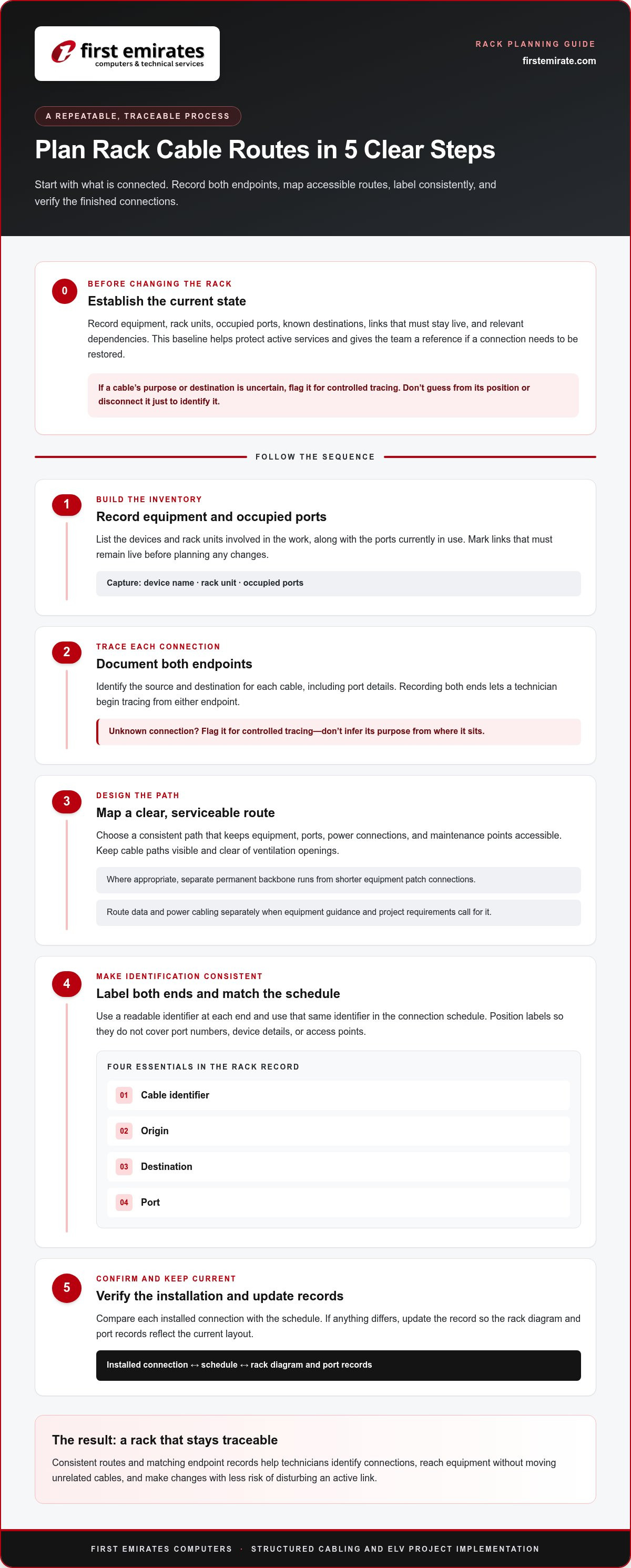
A reliable plan starts with what’s already connected, not with moving cables. Before changing the rack, record the equipment, occupied ports, and known destinations. This baseline helps protect live services and gives technicians a reference if a connection needs to be restored. Treat planning and documentation as part of the physical work, not paperwork to complete later.
Assess equipment, ports, and connection paths before changes
Note each device name and rack unit, the ports in use, and the destination of each cable where it can be identified. Mark links that must remain live and record relevant dependencies. If a cable’s purpose or destination is uncertain, flag it for controlled tracing. Don’t guess based on its position or disconnect it just to identify it.
Use this sequence to prepare the rack:
- 1. Inventory connections. Record the equipment and occupied ports involved in the work.
- 2. Document endpoints. Identify the source and destination for each connection, including port details.
- 3. Plan routes. Map a clear path that preserves access to equipment and, where appropriate, separates permanent backbone runs from shorter equipment patch connections.
- 4. Label. Apply a consistent, readable identifier at both ends and use the same identifier in the connection schedule.
- 5. Verify. Compare the installed connection with the schedule and update the record if anything differs.
Choose a consistent labeling and documentation method
A useful rack record contains four essentials: cable identifier, origin, destination, and port. Record both ends because a technician may begin tracing from either endpoint. If only one end is labeled, identification may still depend on following the cable through the rack, especially when several similar connections run together.
Keep identifiers legible and consistent with the connection schedule. Place labels where they can be read without covering port numbers, device details, or access points. The schedule should match the rack diagram and port records. Update all relevant documents whenever a connection changes so the next technician can distinguish the current layout from an earlier configuration.
This method is useful for both a rack tidy-up and a broader structured cabling project. Coordinating routes, endpoint identification, and project records from the outset supports a clearer handover. For business environments planning structured cabling implementation, a documented connection plan provides a practical foundation for organized installation and future changes.
Which Cable Management Methods Suit Different Rack Layouts?
The right arrangement depends on where cables enter the rack, how equipment is positioned, and how often technicians need to access connections. Vertical and horizontal managers can be used separately or together. The goal of network rack cable management is not to conceal every cable, but to guide it predictably while keeping ports, equipment, and service areas accessible.
Vertical versus horizontal cable management
Vertical managers create pathways along the sides of a rack. They can carry cables between rack levels or organize runs when several devices need connections routed up or down the cabinet. Horizontal managers sit across rack units and guide patch cables between nearby equipment, such as a patch panel and a switch. In a dense rack, combining both can keep cross-rack and vertical runs distinct, provided the arrangement doesn’t obstruct access.
| Method | Placement and purpose | Useful when |
|---|---|---|
| Vertical manager | Along rack sides; guides cables between levels | Cables need a clear path up or down the rack |
| Horizontal manager | Across rack units; guides connections between nearby devices | Patch leads need organizing at equipment level |
| Rack-mounted guides | At selected points along a planned route | A run needs support or direction without a full manager |
Before choosing a layout, consider rack depth, equipment density, cable entry points, and the space needed to reach ports. A route that works in a lightly populated rack may be difficult to maintain after more devices and connections are added.
When to bundle, separate, or leave cables accessible
Group cables by destination or function when doing so makes their paths easier to recognize. Use suitable ties or rack-mounted guides to hold a route in place, but don’t tighten bundles until they strain connectors, compress cables, or make individual leads difficult to trace. Leave enough working slack for service without allowing loops to cover ports, vents, or maintenance points.
There is a practical trade-off: tighter bundles can look orderly, but overly dense groupings can slow inspection and make individual changes awkward. Keep frequently serviced connections easier to reach, and avoid tying unrelated runs together just to make the rack look uniform.
Route power and data cables according to equipment guidance and project requirements, using separate pathways where specified. Account for these routes when planning structured cabling. After installation, check that cables are supported, identifiable, and accessible without blocking equipment ventilation or routine service access.
How to Organize an Active Rack Without Losing Control of Changes
Work on an active rack in controlled stages. Moving several cable groups at once can make it difficult to identify which change affected a connection, so define a manageable scope and preserve connections that are already known to work. A disciplined process makes network rack cable management easier to carry out and review afterward.
A controlled sequence for active rack work
Before touching a cable, review the rack diagram and connection schedule. Identify the devices, ports, and cable identifiers within the planned work area, then record their current state. Include known operational dependencies and mark uncertain connections for controlled tracing rather than making assumptions.
- Document the starting layout. Record affected devices, occupied ports, cable identifiers, and destinations before making changes.
- Define one work group. Choose a limited set of related connections, such as a specific device row or documented patch group. Keep unaffected, known-good connections in place.
- Follow the work sequence. Make the planned change to that group, keeping identifiers associated with the correct cables and ports.
- Verify connectivity. Check the affected equipment and connections against the intended configuration before proceeding.
- Update the record. Note the new device, port, and cable details, then move to the next group only after the current one is verified.
This before-and-after record creates a clear handover trail. If a connection behaves unexpectedly, the team can refer to the last documented state instead of trying to reconstruct several simultaneous changes. For wider infrastructure context, see this structured cabling companies in Abu Dhabi guide.
Routine checks that keep cable layouts maintainable
During planned maintenance, inspect the rack for loose connections, unreadable labels, cables obstructing equipment access, and additions missing from the records. Compare the physical layout with the rack diagram and port schedule. Correct discrepancies in the documentation as part of the work so the records continue to reflect the installed connections.
Keep changes traceable over time. A brief note of what changed, which ports were affected, and when the updated layout was verified can help technical teams coordinate future work. For ongoing system care, read more about IT maintenance and AMC services.
For structured cabling support that keeps rack routes and connection records aligned, see First Emirates Computers’ structured cabling services.
How Structured Cabling Support Keeps Network Racks Ready for Growth
A rack cleanup can be part of a larger infrastructure project, not just a response to tangled patch leads. During a new network deployment, equipment replacement, or site reorganization, planning cable routes and rack positions together helps keep connections identifiable as the environment changes. This makes network rack cable management part of a coordinated infrastructure plan rather than a one-time tidy-up.
When to include rack management in a structured cabling project
Include rack organization when new cable runs are being installed, devices are moving, or existing connections need to be reorganized. Consider the full path from each rack connection to the endpoint it serves. Coordinating device placement, cable entry routes, and endpoint identification helps distinguish permanent infrastructure runs from equipment-level connections.
Plan records alongside the physical layout. Linking cable identifiers to destinations and rack ports gives technical teams a useful reference during maintenance. It also supports capacity planning by making occupied connections and available rack pathways easier to review before future additions are made.
From project implementation to ongoing upkeep
First Emirates Computers is an Abu Dhabi-based provider serving clients across the UAE, with structured cabling and ELV project implementation for business infrastructure. A methodical project can align rack routes with endpoint identification and maintainable documentation, giving the installed layout a clear reference for later service or changes.
Once the project is complete, keeping records current matters as much as establishing them. Equipment moves, new connections, and maintenance work can all change the rack’s original arrangement. Annual maintenance contracts support ongoing IT and security system reliability, while planned reviews can help reconcile physical cabling with project documentation. That record gives teams a more dependable starting point for troubleshooting or planning an expansion.
For a business network deployment, rack reorganization, or wider ELV project, discuss your structured cabling needs with First Emirates Computers. A coordinated approach helps keep connections traceable and infrastructure ready for future changes.
Build a Rack That’s Ready for What Comes Next
Reliable network rack cable management depends on more than tidy routing. Clear labels and accurate records make connections easier to trace, while suitable cable paths preserve access to equipment and support planned changes. A controlled approach to rack work also helps teams protect existing connections and verify updates before moving on.
For growing business networks, treat the rack as part of the wider cabling plan. Align device locations, routes, endpoint identification, and documentation so future maintenance and additions have a dependable starting point. Keeping those records current helps the layout remain useful long after installation.
First Emirates Computers is based in Abu Dhabi and serves clients across the UAE, providing structured cabling and ELV project implementation. If your business is planning a rack reorganization or a wider infrastructure project, discuss your structured cabling requirements with First Emirates Computers. Plan a maintainable rack layout for your UAE business with First Emirates Computers.
Frequently Asked Questions
What is network rack cable management?
Network rack cable management is the physical organization of rack cabling through planned routing, securing, labeling, and documentation. It keeps connections easier to identify and reach during troubleshooting, maintenance, and equipment changes. A reliable layout also preserves access to ports, power connections, and ventilation. A rack can look neat without being well documented, so appearance alone isn’t enough: cable identifiers and records should match the connections in place.
How should cables be arranged in a network rack?
Arrange cables along clear, identifiable routes that keep equipment, ports, vents, and service points accessible. Use vertical managers to guide runs along rack sides and horizontal managers to organize connections across rack units where they suit the layout. Group related cables when it helps identification, but leave individual leads traceable. Plan routes around the rack’s equipment and connection paths, and update documentation when the arrangement changes.
Why is labeling important in a network rack?
Labels help technicians identify a cable’s purpose and destination without relying on guesswork or tracing an entire bundle. Use a unique, readable identifier at both ends, then record it alongside the cable’s origin, destination, and port. For example, matching identifiers can show which patch-panel connection links to a specific switch port. Keep labels clear of port numbers and update the connection schedule after any change.
Should network and power cables be bundled together?
Keep network and power cables in separate pathways where practical, following equipment guidance and project requirements. Combining them in a tight bundle can make connections harder to trace and may create avoidable routing or interference concerns, especially with unshielded data cabling. Plan routes so both cable types remain supported and accessible. Don’t use a shared bundle simply to make the rack look uniform.
How can you manage cables in an active server rack?
Start by reviewing the rack diagram and recording the devices, ports, and cable identifiers affected by the work. Identify connections that must remain live, then reorganize one documented group at a time while leaving known-good connections undisturbed. After each group, verify the intended connectivity and update the rack record before continuing. If a cable’s destination is uncertain, trace it in a controlled way rather than disconnecting it to find out.
How often should network rack cables be inspected?
Inspect cables during planned maintenance and after work that changes rack connections. There isn’t one suitable interval for every environment. Check for loose connections, unreadable labels, blocked access, damaged or strained cables, and additions missing from the documentation. Compare the rack’s physical connections with its diagram and port records. Regular reviews help keep records aligned with the installation and can reveal issues before the next change is made.
Do cable managers improve network performance?
Cable managers don’t increase network speed by themselves. Their value is in guiding and supporting cables so connections remain accessible, routes stay organized, and equipment ventilation isn’t obstructed. Proper cable routing can also help avoid sharp bends or strain at connectors, which may affect a cable’s reliability. Network performance still depends on the equipment, cabling, and correct installation, so cable management supports dependable operation rather than replacing those requirements.
When should a business use structured cabling support for rack management?
Consider structured cabling support during a new network deployment, equipment changes, or a wider infrastructure reorganization, especially when rack routes and building endpoints need coordinated planning. First Emirates Computers provides structured cabling and ELV project implementation for business infrastructure. Based in Abu Dhabi and serving clients across the UAE, the company can align rack organization with endpoint identification and project documentation, while maintenance helps support long-term system reliability.


