

A biometric terminal can be mounted correctly and still cause access delays if the network, enrolment process or door workflow was not planned. A reliable ZKTeco biometric installation involves more than fitting a device. For UAE workplaces, site readiness, cabling and system configuration all affect how smoothly employees can enter and record attendance.
Planning the installation around your existing access-control procedures helps clarify what the system needs to do and how staff will use it. This guide covers the practical steps, from surveying the site and choosing device locations to testing the system and handing it over for daily use.
You’ll learn which project details affect device placement and connectivity, how to test enrolment and recognition, and what to consider when connecting biometric access with existing workflows. We’ll also cover structured cabling, wider ELV coordination and ongoing maintenance. Use these steps to give your team a clear route from requirements to a system ready for use.
Key Takeaways
- Decide whether the system is for attendance, door access or both before mapping devices to entry points.
- Prepare for ZKTeco biometric installation by reviewing user needs, traffic flow and site infrastructure.
- Choose between standalone and network-connected setups based on your operational and integration requirements.
- Commission the system by testing enrolment, recognition, connectivity and the intended access workflows.
- Document the handover and plan ongoing maintenance to support dependable day-to-day operation.
What Does ZKTeco Biometric Installation Involve at a UAE Business?
A ZKTeco biometric installation brings together site preparation, device placement and mounting, system configuration, user enrolment, testing and handover. The work must match the way people move through the workplace and the job the system is expected to do. Steps and capabilities vary by device model and project design, so the selected equipment’s documentation should guide the installation.
Biometrics use physical or behavioural characteristics to help identify a person. A reader may compare an access attempt with an enrolled user’s record. For a general introduction to the technology and its applications, see Biometrics.
How biometric installation supports attendance and access control
Attendance recording and door access serve different purposes. An attendance workflow records a staff member’s check-in or check-out at a designated point. An access-control workflow determines whether someone is permitted to enter a protected door or area. Some sites need one function; others need both, with the system configured for each process.
The reader, software and controller may perform different roles, depending on the system design. A reader captures an enrolment or access attempt, while other components may manage records, apply permissions or control a door. The selected model and project design determine how these functions are arranged. Define the requirements early to avoid treating an attendance terminal as a complete door-access solution, or assuming an access reader will also meet attendance needs.
Which UAE sites need a planned installation approach?
Offices, commercial premises and controlled staff areas all benefit from planning around how people use the site. A reception entrance with regular visitor movement has different demands from a staff-only door used at shift changes. User volumes, entry patterns and operating hours help determine where devices should go, how staff will use them and whether attendance, access control or both are required.
For example, a business with separate staff entrances can map each controlled point and define which user groups are permitted to use it. A workplace recording attendance should also specify where employees are expected to check in and out. These decisions guide the site survey, infrastructure review and system configuration before installation.
In Abu Dhabi and across the UAE, the existing building infrastructure can also shape the project. Structured cabling and wider ELV planning can support suitable connections with other building systems, depending on the selected equipment and design. A planned installation starts with operational needs, not just a device location, and finishes with testing and a clear handover.
How to Prepare a Site for ZKTeco Biometric Installation
A useful site survey separates operational requirements from details that need technical assessment. Your staff can identify the purpose, access points and expected usage patterns. The installation team can then assess mounting locations, available infrastructure and the requirements of the selected device. This avoids making assumptions before cabling or equipment placement is planned.
What should a biometric site survey document?
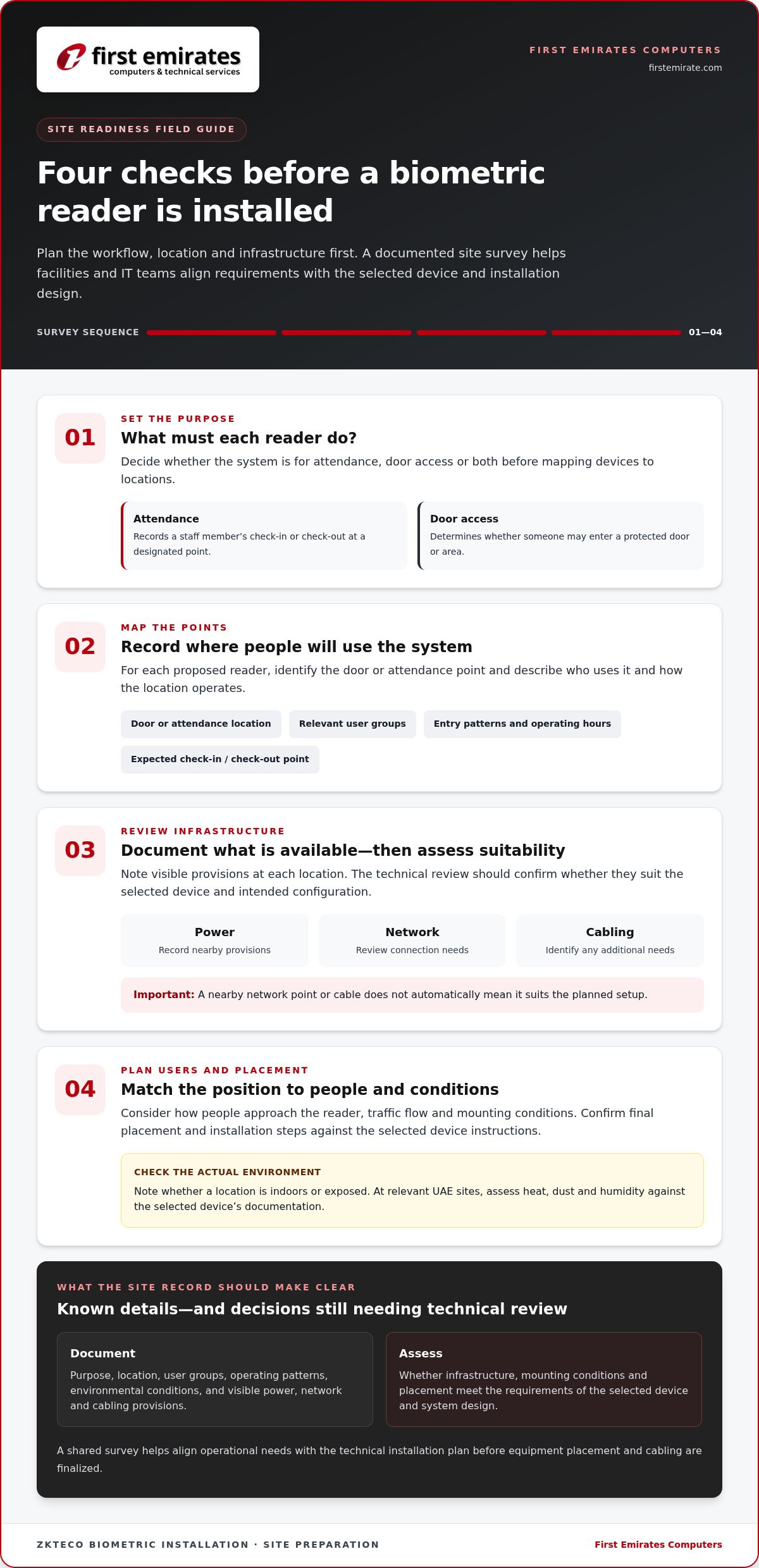
Create a record for each proposed reader location. Note whether it is for attendance, door access or both; identify the door or attendance point; and describe the relevant user groups and operating patterns. Record nearby power, network and cabling provisions for assessment, rather than assuming they meet the device requirements.
Note whether each location is indoors or exposed, and record relevant environmental conditions such as heat, dust or humidity. Assess these conditions against the selected device’s documentation instead of assuming every unit is suitable for every environment.
A practical preparation sequence
- Define the purpose. Decide which workflows the system must support and what users need to do at each reader.
- Map entry and attendance points. Mark doors or recording locations, user groups and the expected times or patterns of use.
- Review infrastructure. Document visible power, network and cabling provisions. Assess suitability, connectivity and any additional cabling needs as part of the technical review.
- Plan users and placement. Consider traffic flow, mounting conditions and how people will approach the reader. Confirm the final position and installation steps against the selected device instructions.
This sequence gives facilities and IT teams a shared project record. It also distinguishes known site details, such as the location of a nearby network point, from decisions that still need technical assessment, such as whether that connection suits the intended configuration.
How should the plan account for UAE workplaces?
Conditions vary between indoor office entrances, service areas and exposed access points. In UAE settings, heat, dust and humidity may matter at some locations. Assess the actual environment against the device guidance rather than applying the same assumptions to every door or site.
Coordinate the installation schedule with staff access, business operations and facilities teams. Plan how the affected area will be managed while work is underway, especially if the reader is on a daily entry route. If the project includes wider access-control integration, map the reader within the overall design and review cabling as part of ELV coordination.
A documented survey provides a practical starting point for biometric access-control planning and helps align site requirements with the installation design.
ZKTeco Device Setup: Mounting, Network Configuration and Integration
Once the site plan is defined, setup decisions determine how the biometric device will be managed and how it fits into the wider access-control design. A standalone arrangement may suit a focused, device-led workflow where the selected model supports it. A network-connected deployment may suit a shared management workflow, but requires planned connectivity and clear responsibility for administering users, permissions and records.
What differs between standalone and networked biometric setups?
Choose an approach based on the intended workflow, not simply on whether a network connection is available. Features, software and integration compatibility vary by equipment. Check the selected ZKTeco model’s capabilities and requirements against its documentation before finalising the design.
| Configuration approach | Typical need | Planning consideration |
|---|---|---|
| Standalone, where supported | A device-led setup with a focused local workflow | Confirm how users, records and settings are managed, and whether the arrangement supports the required attendance or access process. |
| Network-connected | A deployment requiring a defined connection to a management workflow | Plan network access with the IT team, including the relevant policies, responsibilities and system design. |
| Integrated access control | A reader used as part of a broader door-control arrangement | Review the roles of the reader, controller, door hardware and management software, where included, and verify equipment compatibility. |
How do mounting and connectivity affect commissioning?
Mounting affects how people approach and use a reader. Position it for practical reach and the direction of movement, following the selected device’s installation instructions. The surface and surrounding conditions matter too. Assess an exposed entrance differently from an indoor staff area, using the equipment documentation as a guide.
Plan power and cabling as part of the complete layout. The required connection type, cable route and power arrangements depend on the chosen device and project design, so don’t assume one specification applies to every installation. Structured cabling and wider ELV coordination help organise connections within the site infrastructure.
For network-connected equipment, align configuration with the organisation’s IT policies and the agreed management workflow. Coordinate network access, addressing and administration responsibilities before commissioning instead of leaving them as last-minute device settings.
For door access, review how the biometric reader relates to the controller and door hardware, along with any software or existing access-control components included in the project. Establish the roles and compatibility of the selected equipment. This keeps ZKTeco biometric installation aligned with the device instructions and the site’s operational design.
How to Enrol Users, Test Recognition and Address Installation Issues
Commissioning checks whether the configured system works for the intended users, locations and workflows. Before go-live, test enrolment and recognition at the installed reader. Then verify each attendance or door-access action included in the project. Record the results so unresolved issues have a clear owner and follow-up action.
What should be tested before a biometric system goes live?
Use this checklist to review the installation:
- Test representative users. Enrol test users through the planned process and confirm they can complete the intended attendance or access workflow.
- Check recognition at the installed position. Test how users approach the device in normal operating conditions. If recognition fails, review enrolment quality, reader placement and relevant settings before changing the system.
- Verify communication. Check that the device connects as designed and that expected events appear in the appropriate system records.
- Review integrations in scope. Confirm that approved access-control components or other project connections respond as intended. A reader, controller and software do not necessarily perform interchangeable roles.
- Record outcomes. Document unresolved issues, corrective actions and acceptance responsibilities before the system enters routine use.
A structured troubleshooting sequence helps narrow down the cause of a problem. Start with the user’s enrolment, then check positioning and configuration, followed by device communication and relevant integrations. Follow the selected model’s instructions when adjusting settings or repeating enrolment.
How can businesses manage biometric enrolment responsibly?
Explain the purpose and steps of enrolment to staff before the process begins. Internal guidance should tell users what to expect and direct questions to the appropriate site contact. Authorised site personnel should manage enrolment and access to biometric records under the organisation’s approved policies.
Limit access to records to people with an operational responsibility, and handle enrolment information through the organisation’s established processes. UAE data-protection requirements can depend on the organisation and its circumstances. Verify applicable legal obligations with an appropriate legal source rather than relying on installation guidance for legal conclusions.
For a ZKTeco biometric installation, commissioning should finish with documented test results, identified corrective actions and clear acceptance responsibilities. Arrange biometric access-control installation with a defined testing and handover process.
Plan Long-Term ZKTeco Biometric Support with an Installation Partner
A well-planned ZKTeco biometric installation includes support after the reader is commissioned. Clear records and responsibilities help site administrators manage routine changes and report problems. They also give maintenance teams a useful reference when device settings, connectivity or the wider access-control arrangement need review.
What should a biometric installation handover include?
At handover, document the installed components, approved configuration details and the people responsible for system administration. Give staff guidance for routine use, including how to follow the established attendance or access process. Identify where operational issues should be reported, who will assess them and how corrective actions will be tracked.
Keep records accessible to authorised personnel and update them when approved changes are made. For businesses reviewing how a biometric setup fits within a wider security plan, this access control system selection guide offers additional context for planning system requirements.
How does ongoing maintenance support system continuity?
Maintenance provides a planned opportunity to review device operation, network connectivity and authorised configuration changes. These reviews can help identify whether a reported issue relates to the reader, its connection or another component within the project scope. Record adjustments so administrators and support personnel share an accurate system history.
Align maintenance responsibilities with business continuity priorities. A site that depends on biometric access for daily staff entry needs a clear process for logging faults and managing operational changes. Agreeing who monitors system status, approves configuration changes and coordinates follow-up makes support practical and accountable.
First Emirates Computers installs biometric access-control systems, implements ELV projects and provides annual maintenance contracts. These services support a coordinated route from project delivery to ongoing system care. Businesses considering wider continuity planning can also review IT AMC services in Abu Dhabi.
Document your operational priorities, assign site administrators and define how the system will be maintained. Plan your biometric access-control installation and ongoing support with First Emirates Computers.
Build a Biometric System That’s Ready for Daily Use
A dependable ZKTeco biometric installation starts with clear operational requirements and a site plan covering device placement, power, connectivity and the intended access or attendance workflow. Commissioning verifies enrolment, recognition and system communication. A documented handover gives administrators a practical reference for daily operation and issue reporting.
Long-term reliability also depends on planned maintenance. Reviewing device operation, connectivity and authorised changes helps keep support responsibilities clear as workplace needs evolve. First Emirates Computers is an Abu Dhabi-based provider of security and biometric access-control systems, serving clients across the UAE. Its ELV project implementation, structured cabling and annual maintenance contracts support coordinated installation and ongoing technical care.
Discuss your ZKTeco biometric installation requirements with First Emirates Computers and plan a system around your site and security workflow.
Frequently Asked Questions
Is ZKTeco biometric installation suitable for both employee attendance and door access?
Yes. Depending on the selected device, system design and configuration, it can support attendance, door access or both. These are distinct workflows: attendance records staff check-in or check-out, while access control manages entry permissions at a door. Define the required function at each location and how events will be managed. Check device capabilities and integration requirements in the manufacturer’s documentation before finalising the design.
How long does ZKTeco biometric installation take?
Installation time depends on project scope and site conditions, so one duration will not apply to every deployment. The number and location of devices, site readiness, cabling, network access, enrolment needs and integration work all affect the schedule. A straightforward setup may require less coordination than a multi-door installation. A site assessment helps set a realistic schedule and plan work around business operations.
Can a ZKTeco biometric reader work with an existing access-control system?
Integration depends on the exact reader, controller, software and existing system architecture. Review the relevant manufacturer documentation alongside the project requirements rather than assuming different systems will connect automatically. Define how permissions and events will be managed, then include integration tests before handover to confirm the configured components work together as intended.
What should staff know before biometric enrolment begins?
Staff should understand why the system is being used, what enrolment involves and whom to approach with questions. Explain the process before enrolment starts, and have authorised site personnel manage it according to the organisation’s policies for biometric records. Businesses in the UAE should verify applicable data-protection requirements with an appropriate legal source. Technical installation guidance is not a substitute for legal advice.
What happens if a biometric device does not recognise an enrolled user?
Start by checking the enrolment record, the user’s positioning, device condition, settings and connectivity. Note the symptoms and any recent changes, since recognition issues can have more than one cause. Follow the specific model’s instructions, make an adjustment and test again. If the problem affects routine attendance or access, report it through the agreed technical support process.
Does a ZKTeco biometric installation need network access?
Network requirements depend on the selected device and whether the project needs central management, remote configuration or integration with other systems. Some equipment may support a different operating arrangement. Check requirements against the device documentation, project design and organisation’s IT policies. Coordinate with the IT contact before connecting devices to the business network.
Why plan maintenance after biometric installation?
Planned maintenance helps organisations review device operation, connectivity, configuration and reported issues as users, infrastructure or access needs change. It also establishes who is responsible for monitoring the system, approving changes and following up on faults. The appropriate schedule and scope depend on the installed equipment and operational priorities. In the UAE, businesses can include biometric systems in a broader support plan, such as an annual maintenance contract.


