

A locked entrance alone does not determine who may enter. Access control for residential buildings verifies a credential, such as a key card, PIN, mobile ID or biometric identifier, then grants or denies entry according to assigned permissions.
Residents need convenient access to their homes and shared spaces, while property managers need a clear way to manage entry for residents and visitors. A well-planned system balances these needs by assigning permissions to different people and entry points.
This guide explains how credentials, readers and controllers work together, and compares access methods such as key fobs, mobile credentials and biometrics. It also covers day-to-day building management, visitor access and future upgrades, so you can identify the design considerations that matter for a residential property in the UAE.
Key Takeaways
- Compare manual, mechanical, electronic and mechatronic entry systems to understand how each controls access in a residential property.
- Learn how credentials, readers and controllers work together to grant or deny entry and record access activity.
- Weigh cards, mobile credentials and biometric methods against residents’ needs, visitor access and building operations.
- Consider how permissions, intercoms, cameras and shared amenities shape the experience for residents and property managers.
- Plan for emergency access, privacy, system integration and future upgrades when assessing a building’s access requirements.
What is Building Access Control?
Building access control determines who may enter a residential property, which access points they can use and what permissions they have. Systems range from a key-operated lock to electronic readers coordinated with intercoms and elevators.
Manual, Mechanical, and Electronic Systems
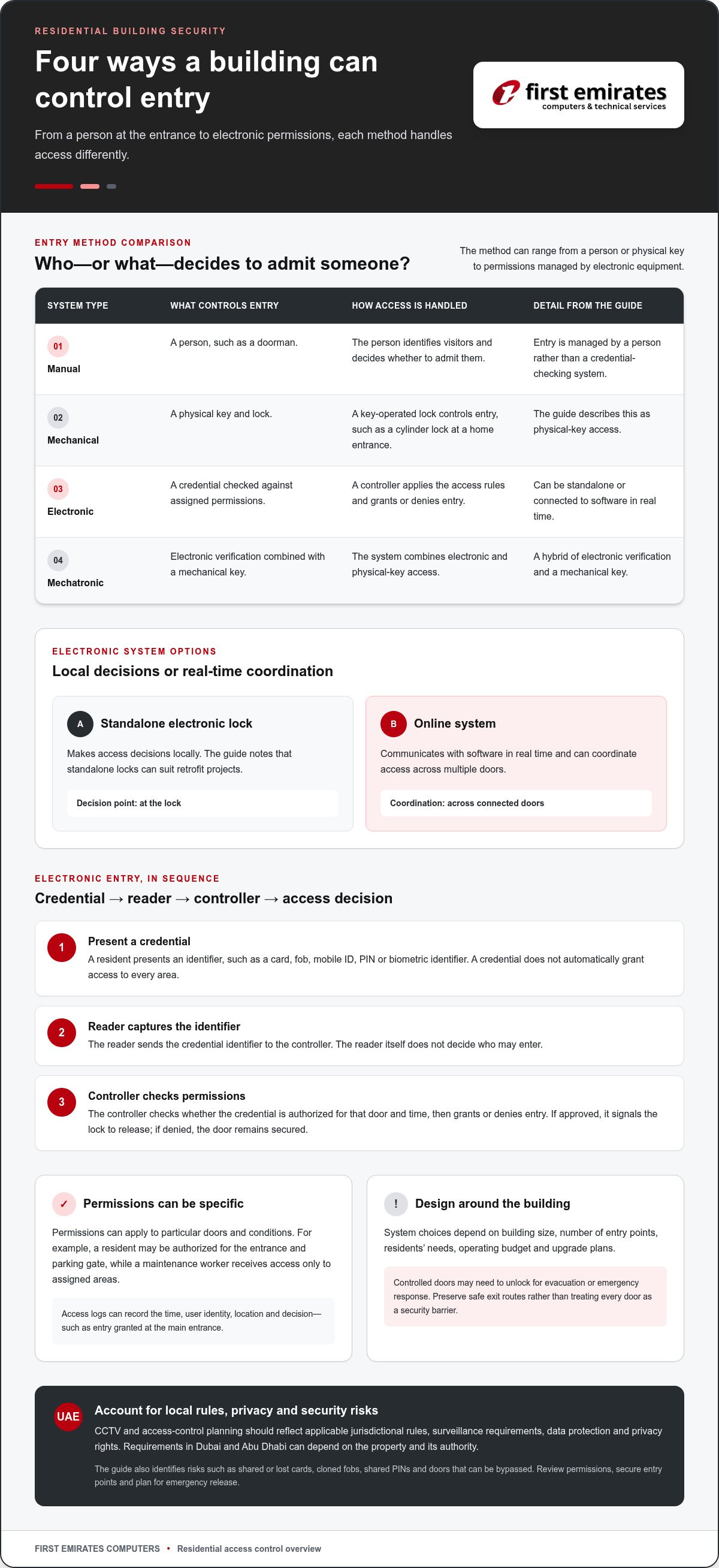
Manual control relies on a person, such as a doorman, to identify visitors and decide whether to admit them. Mechanical control uses a physical key, as with a cylinder lock at a home entrance. Electronic systems check credentials against assigned permissions, while mechatronic locks combine electronic verification with a mechanical key.
The difference matters because each method manages entry in its own way. A small building may use a key or fob at one entrance, while a larger property may need an online system linked to central software. Standalone electronic locks make decisions locally and can suit retrofit projects. Online systems communicate with software in real time and can coordinate access across multiple doors.
Integration with Building Security and Safety Systems
Integration connects access control with systems such as intercoms, CCTV, gates, automatic doors and elevators. For example, a resident can identify a visitor through a video intercom before granting entry, while elevator permissions can limit access to designated floors.
Residential system design should account for routine entry and emergencies. Controlled doors may need to unlock to support evacuation or emergency response procedures. Some systems can also connect with fire or sprinkler equipment. These connections must preserve safe exit routes, rather than treating every door as a security barrier.
Access control can support CCTV by linking recorded entry events with activity at a building entrance. Integration also depends on compatible equipment, communication paths and clear permissions for residents, visitors and staff. A property manager can coordinate access across entry points while maintaining separate controls for shared areas such as parking or amenities.
System Choices, Regulations, and Risks
Choose a system based on the building’s size, number of entry points, residents’ needs, operating budget and upgrade plans. A smaller property may use a video intercom or key fobs; a larger building may benefit from centralized permissions across doors, gates and shared facilities. Consider residents’ needs, too: credentials should be practical for the people who use them.
In the UAE, CCTV and access control planning must account for applicable jurisdictional rules, surveillance requirements, data protection and privacy rights. Requirements in Dubai and Abu Dhabi can depend on the property and its authority, so the system design should reflect the rules that apply to its location. No single access method replaces this review.
Risks include shared or lost cards, cloned fobs, shared PINs and doors that can be bypassed. PINs can be compromised when residents disclose them, while a physical barrier can undermine electronic controls if it is easy to circumvent. Review permissions, secure entry points and plan for emergency release as part of a complete design.
Access credentials, readers, and controllers
An electronic entry process starts with a credential, continues at a reader and ends with the controller’s access decision. If a resident loses a key fob, the property manager should revoke its permissions and issue a replacement credential. Residents also need a planned fallback for system failures that preserves safe entry and exit.
Credential Verification and Access Decisions
Credential verification checks a presented identifier against stored records and permissions. The reader alone does not decide who may enter; the controller applies the building’s access rules.
For example, a resident presents a card at the main entrance. The reader captures its identifier and sends it to the controller, which checks whether the credential is authorized for that door and time. The controller then grants or denies entry. A visitor using an intercom may follow a separate approval process before access is released.
Credentials can include key cards, fobs, mobile IDs, PINs or biometric identifiers. Each represents an identity or permission in the system, but does not automatically grant access to every area. A resident might be authorized for the entrance and parking gate, while a maintenance worker receives access only to assigned areas.
Controllers apply permissions to specific access points. Depending on the installation, a controller can connect to an electronic lock, reader, door sensor or exit device. When entry is approved, it signals the lock to release; if permission is denied, the door remains secured. Reader placement and wiring also affect reliable communication with the controller.
Permissions, Locks, and Access Records
Permissions define which credentials can open particular doors and under what conditions. This matters in buildings with separate entrances, parking areas and shared amenities.
Electronic credentials are managed through system records, so a manager can change permissions when a resident moves or a credential is reported lost. Access logs can record the time, user identity, location and decision, such as entry granted at the main entrance. These records help managers review an event, while permissions determine what a credential can do next.
Plan the installation around the building’s doors and entry routines, matching credentials, readers, controllers and locks. A reader at a vehicle gate, for instance, may need different placement from one at a pedestrian entrance. Coordinating access control with an intercom also lets residents assess visitors before granting entry.
For residential projects requiring biometric access control, consider how readers, permissions, and electronic locks will work together during installation.
Access-control methods including RFID, fingerprint, facial recognition, QR codes, and mobile access
Residential entry can use a card, biometric identifier, PIN, QR code or phone credential. Each method offers a different balance of convenience, identity verification and visitor management.
RFID and Biometric Access Methods
RFID access uses a card or fob that communicates with a nearby reader, while biometric methods verify physical characteristics such as fingerprints or facial features. These options matter because residents need credentials suited to everyday entry, and managers need a method that fits the building’s access points.
RFID readers can operate at 125 kHz or 13.56 MHz. NFC communicates with compatible cards and mobile devices and is commonly part of 13.56 MHz RFID readers. A resident can present a fob at a lobby reader, while a biometric reader checks a fingerprint or face against an enrolled identity.
Biometric access control does not rely on a card held by the resident, but requires suitable readers and enrolled biometric data. RFID cards and fobs are simple to present, yet they can be lost, shared or cloned. When choosing a method, consider entry volume, resident routines and how credentials will be managed.
QR Codes and PIN Access
QR and PIN access let users present a scannable code or enter a numeric credential at a reader. These methods can help manage visitor entry because a temporary code avoids issuing a permanent resident card.
For example, a visitor can present a QR code at the entrance reader, while a resident enters a PIN on a keypad. The system checks the credential and applies its permissions before releasing the door. A building can assign different permissions to residents and visitors, keeping access to shared areas separate from entry to residential floors.
PINs are easy to share, which can weaken control when several people use the same code. They are typically used in lower-risk areas or alongside other security measures. QR credentials also need defined permissions and an expiry process, so a visitor’s code does not remain usable after the visit.
Mobile Credentials and Remote Management
Mobile credentials let residents use a phone instead of a key fob, while remote management allows administrators to manage permissions from a distance. These features can make entry convenient for residents and visitor access easier to control for property staff.
A manager can issue a temporary mobile credential to a visitor, then revoke its permission when it is no longer needed. Residents can use a compatible phone at a reader, while administrators update access rights through the system. This can simplify changes when a resident moves or a visitor’s access period ends.
Mobile, QR and PIN methods can serve different entry situations within one building. A resident might use a mobile credential at the lobby, while a delivery visitor receives a time-limited QR pass. The system still needs clear permissions for each door and user; convenience alone does not determine which areas a credential can open.
Benefits for residents and property managers
Residential access control can make everyday entry more convenient and help managers oversee permissions at shared doors. Its practical value depends on how residents, visitors, delivery workers and building staff use each entrance.
Resident Convenience and Shared Amenities
A resident can use a smartphone credential or access card at the lobby, then use assigned permissions for a gym or parking garage. This provides a managed approach to different shared areas, rather than treating every door as an unrestricted entrance. Access rights can reflect who needs each space, helping limit unauthorized use without blocking authorized residents.
Property managers can assign access according to residents’ roles or needs. For example, a resident’s permissions may cover the lobby and parking, while a service area remains restricted. Role-based access gives managers a structured way to separate permissions. Each credential is tied to specific entry rights, rather than broad access to every shared space.
Visitor and Delivery Management
Visitors and deliveries create different demands at a residential entrance. A video intercom lets a tenant see who is requesting entry before deciding whether to admit them. In a large apartment building, audio and video intercoms can also support delivery monitoring and front desk security.
For example, a delivery person can call through the intercom so the resident or front desk can assess the request. This gives the building a clear way to handle arrivals without leaving an entrance open for convenience. Temporary credentials can also give visitors defined access, while managers control which doors they can open.
Cloud-Based and On-Premises Management
Cloud-based access control lets administrators manage permissions remotely from a device. A manager can update a resident’s entry rights without being at the building’s control point. Access software can also centralize permission management and help staff review activity across designated entrances.
On-premises systems connect access components to software hosted within the building’s system. Online access systems exchange messages with their host software, supporting coordinated decisions at connected doors. The right management model depends on the building’s infrastructure and operating processes. In either case, managers need procedures for updating permissions when occupancy changes.
Access records can help clarify an event, such as an entry attempt at a lobby door. Combined with a video intercom, they provide separate information about the credential event and the person requesting entry. The systems serve distinct purposes: credentials govern access, while the intercom helps residents assess visitors before granting entry.
Access control for residential buildings
Residential access control must serve residents entering and leaving at all hours while managing access to shared and private areas. In a building with a lobby, parking gate, service entrance and gym, each access point can have distinct permissions. A centralized system helps managers oversee them through one coordinated approach.
Start with the building layout and residents’ routines. A small apartment property with one entrance may need a different arrangement from a tower with several lobbies, vehicle gates and shared facilities. Consider who uses each door, how visitors enter and whether staff need access to service areas. These details determine where readers, locks and controllers belong.
Permissions can be based on roles, rules or ownership of a space. Role-based access gives residents, maintenance workers and building staff different entry rights. Rule-based access can restrict entry by time or location. Discretionary access lets the owner of a specific space decide who may enter. For example, gym access can be managed separately from the main lobby.
System architecture also affects future upgrades. Standalone components make decisions locally and can suit retrofit projects with limited wiring changes. Online systems communicate with software in real time and can coordinate multiple doors. Modular hardware can allow an existing building to add components without replacing all its infrastructure, provided the equipment works together.
Plan for changes in occupancy and equipment. Integration with property management software can update permissions when property information changes. For example, a move-out should trigger changes to access rights for relevant doors. Components that accommodate future upgrades can also help prevent the initial design from limiting later additions, such as another gate or reader.
Physical design matters as much as electronic permissions. A controlled door can be undermined if another route is easy to bypass, so assess the entire approach to each entrance. Emergency procedures matter too: access-controlled doors may need to unlock for safe evacuation and emergency response. Fail-safe locks release when power is removed; fail-secure locks remain locked from the secure side during a power loss. The application and exit route determine which arrangement suits each door.
The practical takeaway is to map entry points, user groups, shared spaces, and emergency routes before selecting components. Then match credentials and permissions to each use, and account for future equipment. For a residential project requiring biometric access control, discuss biometric access control requirements as part of the system design.
First Emirates Computers: CCTV Surveillance Systems
First Emirates Computers helps residential property teams plan CCTV surveillance systems alongside biometric access control. Consider this approach when a building needs entry management and camera coverage at relevant access points. Structured cabling supports the physical connections across the property, while an Annual Maintenance Contract supports ongoing system maintenance.
For example, a property manager planning controlled lobby access can assess how readers, cameras and cabling fit the building layout. The right configuration depends on the property’s entry points, existing infrastructure and operational needs. Discuss your residential security requirements with First Emirates Computers, or visit firstemirate.com.
Turn Building Requirements Into a Practical Plan
Before selecting a system, turn the building’s priorities into a practical brief. Note which entrances need controlled access, who uses each area, how visitors are handled, and what should happen during a power interruption or evacuation. This helps property teams assess access control for residential buildings against daily operations, rather than choosing credentials in isolation. Include future changes, such as new shared facilities or altered staff responsibilities, so the plan can adapt to evolving needs.
First Emirates Computers offers CCTV Surveillance Systems, Biometric Access Control and Structured Cabling for residential infrastructure projects. These services support monitoring, identity-based entry and the physical connections between system components. The next step is to discuss the property’s layout and requirements with the technical team.
Contact First Emirates Computers to discuss your building’s access control requirements. A clear project brief can help move the conversation toward a practical design.
Frequently Asked Questions
What is an ACS System?
An ACS is an access control system that regulates entry to a property. In access control for residential buildings, it can connect credentials, readers, locks and management software to govern who enters specific areas. A building manager might use it to separate resident access from contractor access. The design depends on the property layout, entry points and how occupants and staff use those spaces.
What access control systems are available for residential buildings?
Residential properties can use manual entry management, mechanical keys, standalone electronic locks or networked access systems. A small building might rely on a video intercom at its main door, while a multi-entrance property may need coordinated permissions for its lobby, parking gate and shared facilities. Systems can combine components, such as local electronic locks with online readers at busier entrances, to meet different building needs.
How do key fobs, PIN codes, mobile credentials, and biometric entry compare?
Key fobs provide a physical credential, PINs require a code, mobile credentials use a compatible phone, and biometric entry checks a fingerprint or facial feature. Each method has different management needs. A lost fob can be disabled; a shared PIN may be harder to control. Mobile credentials can support temporary visitor access, while biometric readers require enrolled identity data. Building managers should consider user convenience alongside access oversight.
How much does residential building access control cost to install and maintain?
Cost depends on the property layout, number of controlled entry points, chosen readers and locks, cabling needs, and integration with existing equipment. Installation and ongoing maintenance are separate considerations, particularly for buildings with several entrances or mixed hardware. Pricing is determined after a quote request; the main cost factors include equipment, installation scope, infrastructure and maintenance requirements. No single figure suits every property.
What are the steps to choose and install an access control system in an apartment building?
Start by documenting entrances, shared areas, residents’ routines, visitors and emergency exit requirements. Then select credentials and permissions for each user group. Before installation, map the locations of readers, locks, controllers and intercom connections, and identify infrastructure that can be reused. After installation, test normal entry, denied credentials, visitor handling and emergency procedures. A clear handover should explain how managers update permissions and handle lost credentials.
How should building managers control access for residents, visitors, delivery workers, and contractors?
Assign permissions according to each group’s purpose, rather than giving everyone the same access. Residents need routine entry, while visitors can be admitted through an intercom or given temporary credentials. Delivery workers should access only the areas needed for deliveries, and contractors should have permissions aligned with their work locations. Managers can review access records and remove temporary rights when a visit or work assignment ends.
How should access credentials and access logs be managed to protect resident privacy?
Limit credentials to the doors and facilities each person needs, and restrict system administration to authorized staff. Treat access records as sensitive building information: define who may review them, why they may be reviewed and how long they are retained under applicable requirements. In the UAE, managers should account for relevant jurisdictional rules on surveillance, data protection and privacy when access systems connect with CCTV.


