

Reliable Cat6 installation starts with the building, not the cable category. Cat6 cable installation Abu Dhabi projects need to account for the connected devices, network workloads, available cable routes, and whether work must take place around an occupied office, warehouse, or home. Even a suitable cable can lead to avoidable faults if planning and installation details are overlooked.
To support current needs without making future changes harder, plan the cable routes, outlet locations, and handover records before work begins. This guide explains where Cat6 fits, what to consider when planning routes and terminations, and how to organise a structured cabling project around an occupied property. It also covers the information that helps teams understand and manage the installed network.
First Emirates Computers is an Abu Dhabi-based provider of structured cabling and ELV project implementation. The sections ahead explain the practical installation sequence, how cabling can form part of wider IT and ELV infrastructure, and how ongoing maintenance can support long-term infrastructure management.
Key Takeaways
- Plan cabling around the devices, network workloads, building layout, and potential expansion, rather than choosing a cable category in isolation.
- Map network outlets to workstations, wireless access points, CCTV cameras, and compatible PoE devices before installation begins.
- Compare Cat6, Cat6A, and fibre by use case, run distance, equipment requirements, and upgrade plans to identify the right fit for each part of the network.
- A well-planned Cat6 cable installation Abu Dhabi project accounts for routes, access, and work coordination across occupied offices, warehouses, or homes.
- Use a clear project scope and handover process to keep structured cabling organised as part of wider IT and ELV infrastructure.
What Cat6 Cable Installation in Abu Dhabi Actually Provides
Cat6 is a category of copper Ethernet cabling used to carry data through a structured network. A fixed Cat6 link provides a physical connection between a network outlet and central equipment, creating a wired pathway for devices. Unlike Wi-Fi, it carries data over cable. For a concise overview of the category, see Category 6 cable (Cat6).
In a typical layout, cables run from designated outlets back to a central rack or cabinet. At the rack, terminations and patch panels organise the permanent cabling. Patch leads connect those links to network switches. At the user end, an outlet provides a connection point for a computer, access point, or other compatible device. The switch and connected equipment then handle network traffic.
Cat6 cable installation Abu Dhabi projects establish this physical layer. They don’t automatically include an internet subscription, Wi-Fi configuration, or every item of active network equipment. These are separate parts of a site’s IT setup and should be distinguished from the fixed cabling scope. Performance depends on the complete channel, including terminations, patching, installation quality, and connected equipment. A cable category alone cannot ensure a particular result if another part of the link is unsuitable.
What is included in a Cat6 cabling run?
A run follows a planned route from network equipment to a designated outlet or device location. Its scope may include the cable, the route through the premises, terminations at both ends, and the outlet point. Patch panels and racks provide an organised location for managing multiple links. Their inclusion and configuration depend on the project design.
Scope varies with the premises and network layout. An office may need outlets positioned for desks and shared equipment, while a warehouse may need routes planned around its layout and device locations. Defining the endpoints and the path between them helps clarify what the installation covers.
Where do Abu Dhabi businesses use Cat6 cabling?
Common applications include wired office workstations, wireless access points, CCTV cameras, and other network-connected systems. In commercial offices, outlets may serve desk areas and meeting spaces. Warehouses may need connections at operational locations, while residential buildings can use fixed links for home network devices and access points.
These examples are potential uses, not a universal layout. Outlet locations, cable routes, and connections depend on the building, selected devices, and how the network will be used. Planning Cat6 as part of structured cabling and wider ELV infrastructure helps align the physical network with the premises instead of assuming every site needs the same design.
How Cat6 Supports Office, CCTV, and ELV Network Requirements
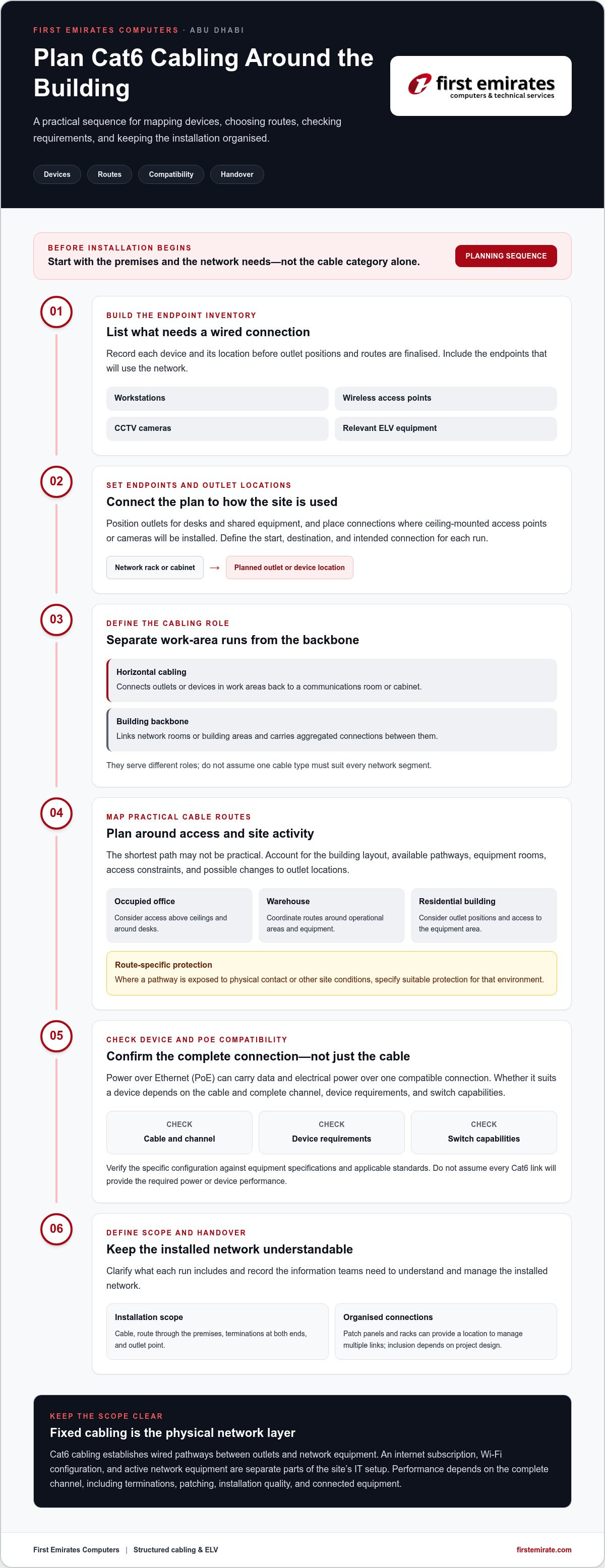
Cat6 cabling can provide fixed network connections for a range of devices, but useful planning starts with knowing what must connect and where. An office workstation may need a data outlet at a desk, while a ceiling-mounted access point or CCTV camera may need a connection at its installation location. Mapping each endpoint before setting routes helps align the cabling plan with the way the premises will operate.
It also helps to distinguish horizontal cabling from the building backbone. Horizontal runs connect outlets or devices in work areas back to a communications room or cabinet. The backbone links network rooms or building areas and carries aggregated connections between them. These are related parts of the network, but they serve different roles and may call for different design choices. Define Cat6’s role within the wider layout rather than assuming one cable type must serve every segment.
Planning Cat6 for data, CCTV, and PoE devices
Before finalising outlet positions, prepare a device inventory that records each endpoint’s location and connection needs. Include workstations, wireless access points, CCTV cameras, and relevant ELV equipment. This helps coordinate outlet placement with furniture, camera positions, and equipment-room locations, and identify where a dedicated link is needed.
Power over Ethernet (PoE) can carry data and electrical power over a single compatible connection, which may reduce the need for a separate power connection at some devices. Suitability depends on the cable and complete channel, the device’s requirements, and the switch’s capabilities. Don’t assume every Cat6 link will provide the required power or device performance. Confirm the planned system against equipment specifications and applicable standards, and verify exact bandwidth, distance, and PoE limits for the specific configuration.
Planning cable routes for Abu Dhabi premises
Route planning should reflect the building, not just the shortest path between two points. An occupied office may have limited access above ceilings or around desks. A warehouse may require coordination around operational areas and equipment. In a residential building, outlet locations and access to the equipment area can shape the practical route. Recording these constraints early helps coordinate installation with the premises’ use.
Plan around accessible pathways, equipment rooms, and likely changes to outlet locations. Where a route passes through an area exposed to physical contact or other site-specific conditions, specify suitable protection for that environment. The right approach depends on the route, cable, and installation specifications, so avoid assuming one method suits every property.
A clear device schedule and route plan give the installation team a shared reference for outlets, endpoints, and network-room connections. For official UAE telecommunications information, consult the Telecommunications and Digital Government Regulatory Authority (TDRA). A Cat6 cable installation Abu Dhabi project can also be scoped as part of structured cabling and ELV project planning, bringing device requirements and site conditions into the same plan.
Is Cat6 Enough, or Should You Choose Cat6A or Fibre?
No single cable type is automatically right for every Abu Dhabi property. The decision depends on connected devices, link distances, existing infrastructure, expected network demand, and the cost and disruption of future changes. Cat6 may suit some network links, while Cat6A or fibre may better match other requirements in the same building.
| Option | May suit | Key planning consideration |
|---|---|---|
| Cat6 | Everyday office and building connections where the planned channel meets device and network requirements. | Check the complete link, including terminations and connected equipment. |
| Cat6A | Links that need its verified capabilities or additional capacity for planned devices and workloads. | Assess the required channel performance and installation conditions. |
| Fibre | Suitable backbone or building-to-building links, subject to network design. | Consider the endpoints, existing infrastructure, and equipment required at each end. |
This comparison is a starting point, not a specification. Exact bandwidth, distance, and PoE limits depend on applicable standards, the complete channel, and equipment manufacturers’ requirements. Verify those figures against the proposed design before using them to set project expectations.
When is Cat6 a practical choice?
Cat6 can be a practical option for office workstations, network outlets, and other building connections when its verified capabilities align with the planned use. Start with the devices and their network interfaces, then consider expected workloads and the installed channel. A switch, endpoint, or other component with lower capabilities can limit end-to-end performance, even if the cabling is designed for more.
For Cat6 cable installation Abu Dhabi projects, assess individual links rather than choosing a category based on a general label. Existing cabling may also affect the decision. Reusing a route or infrastructure can influence scope, but only if it suits the planned network and its requirements.
When should a project consider Cat6A or fibre?
Consider Cat6A where verified project requirements call for capabilities beyond the proposed Cat6 channel, or where planned devices and workloads justify additional headroom. Fibre may be appropriate for a backbone or a connection between buildings, depending on distances, endpoints, and the wider network design. A mixed approach may suit the project better than using one medium everywhere.
Before deciding, compare current needs with planned expansion and the effort involved in future upgrades. A new office layout, added network devices, or changes to the backbone may influence different parts of the design in different ways. For broader infrastructure considerations, see this structured cabling companies guide.
What Happens During a Cat6 Cable Installation in Abu Dhabi?
A structured cabling project follows a defined sequence: establish requirements, map routes and endpoints, install and terminate the cabling, then inspect, test, and hand over the agreed scope. Planning matters as much as the physical work. In an occupied office, installation may need to be coordinated around staff, furniture, and access to work areas. A warehouse may require routes and work zones that account for ongoing operations, while a residential property may have different access and finish considerations.
For Cat6 cable installation Abu Dhabi projects, tailor the schedule, work areas, and handover to the premises. A clear scope helps the site team understand what will be installed and what records will be provided at completion.
From site survey to cable route plan
The planning stage connects network requirements to actual site conditions. A site review can identify outlet locations, equipment-room positions, practical cable routes, access limitations, and anticipated expansion needs. The proposed layout should also account for relevant ELV systems so network links can be coordinated with device locations and requirements.
- Record endpoints: Identify planned outlets and the devices or work areas they serve.
- Review routes and access: Note the intended pathways, equipment areas, and locations where work may affect daily operations.
- Coordinate the scope: Align the plan with business activities and related systems, and verify project-specific building or authority requirements before treating them as applicable.
This review gives the project team a practical basis for agreeing the work scope and coordinating access. In an operating office or warehouse, separating work areas or agreeing access arrangements can help reduce disruption. The approach depends on the premises and planned installation.
Installation, testing, and project handover
Once the route plan and scope are agreed, the work moves through distinct tasks. Cable placement follows the planned pathways; terminations connect each run at its designated ends; and labelling identifies links for later reference. Inspection checks that the work corresponds to the layout, while testing should match the agreed scope and applicable technical requirements. Don’t assume a particular certification or test report is included unless it forms part of the project scope.
Handover documentation can be tailored to the installation. Useful records may include the final outlet or cable identification schedule, the locations served, and any test results included in the agreed deliverables. Clear labels and records make it easier to trace a connection when equipment or office layouts change. Where cabling supports access-control infrastructure, the access control system guide provides related planning context.
First Emirates Computers delivers structured cabling and ELV project implementation in Abu Dhabi. To plan a cabling project around your premises, devices, routes, and handover needs, discuss your Cat6 installation requirements.
Plan Cat6 Installation with First Emirates Computers in Abu Dhabi
A cabling project works best when its scope reflects how the premises and connected systems will be used. First Emirates Computers provides structured cabling and ELV project implementation from Abu Dhabi. For Cat6 cable installation Abu Dhabi requirements, the cabling should be planned as part of the site’s wider infrastructure, rather than treating each outlet as an isolated task.
How a tailored Cat6 project is scoped
Project planning begins with the intended users, the systems that need connections, and the building layout. A small office, warehouse, and residential property can have different access conditions and endpoint needs, so the design and scope should reflect the actual premises. Relevant ELV infrastructure can also be considered alongside the cabling layout to coordinate network connections with the systems they support.
A practical scope brings together the key project details:
- Premises: The areas served, access constraints, and locations available for network equipment.
- Devices: Workstations, access points, CCTV, and other systems requiring network connections.
- Routes and outlets: Planned cable pathways and the positions of connection points.
- Network requirements: Intended use, connected equipment, and plans for future changes.
- Handover: The identification and documentation needed to make the completed installation understandable.
These details help define a project-specific scope without assuming one specification, schedule, or outcome suits every site. Clear planning also gives stakeholders a shared reference for coordinating cabling work with business activities and related ELV requirements.
Keep network infrastructure manageable after installation
Useful handover information supports day-to-day management after installation. Clear cable and outlet identification, together with organised project documentation, helps staff trace connections when a device moves, an area is reconfigured, or a fault needs investigation. Records should reflect the installed layout and agreed deliverables, so they remain practical reference material.
Infrastructure planning continues beyond project handover. First Emirates Computers offers annual maintenance contracts for ongoing IT and security system support. These contracts can support the management of relevant IT and security assets over time. Keeping cabling records available alongside asset details helps maintain a clearer picture of the site’s infrastructure.
For a structured cabling project coordinated with relevant ELV requirements, discuss a Cat6 cabling project with First Emirates Computers.
Set Your Network Up for the Next Stage
Turn your network plans into a practical project brief by considering which areas may change, where new devices could be added, and how the premises will be used as your team or operations develop. Sharing those priorities early helps shape a cabling scope around how the property works, not just its immediate connection needs.
For Cat6 cable installation Abu Dhabi businesses can treat planning as part of a wider infrastructure decision. First Emirates Computers brings structured cabling and ELV project implementation together, with annual maintenance contracts to support ongoing IT and security system management. A considered discussion helps set project priorities and identify the next steps for your premises.
Discuss your Cat6 cabling project with First Emirates Computers and move forward with a clear plan for your network infrastructure.
Frequently Asked Questions
Is Cat6 suitable for a small office in Abu Dhabi?
Yes, Cat6 can suit a small office if its verified specifications align with the network equipment, applications, routes, and expected changes. User count alone isn’t enough to choose a category. For example, plan outlet positions around desk layouts and shared printers, then consider whether teams may move or add devices. A Cat6 cable installation Abu Dhabi project should assess the complete planned channel and connected equipment before confirming the design.
Can Cat6 cable support PoE devices such as access points or cameras?
Yes, Cat6 may be used for Power over Ethernet (PoE) connections when the full system meets the relevant requirements. Check the switch’s PoE capacity alongside each device’s power needs, especially if several cameras or access points will operate from the same equipment. The cable, terminations, and channel also matter. Use equipment specifications and applicable standards to validate the design, rather than assuming a Cat6 label alone establishes PoE suitability.
What is the maximum distance for a Cat6 cable run?
There isn’t one distance figure that applies to every Cat6 installation and data rate. A stated limit may refer to the permanent link or to the full channel, which includes connecting cords and terminations. These are different measurements. Before recording a distance in a project specification, identify which measurement is being used and verify the relevant standard and equipment requirements for the planned link.
Does Cat6 cable installation include network switches and internet service?
Not necessarily. Cabling work generally covers the physical links and connection points, while switches, routers, Wi-Fi configuration, and internet service are separate deliverables unless the project scope includes them. For example, an office may have new outlets installed but still need switches configured and its internet connection arranged separately. Define responsibilities for each item before work starts, so the handover makes clear what is ready and what remains outside the cabling scope.
Can existing Cat6 cabling be reused during an office upgrade?
Possibly, if the existing links meet the upgraded network’s requirements. Before relying on them, review their condition, endpoint labels, terminations, routes, and suitability for the new equipment. A layout change may leave outlets in inconvenient locations even if the links remain usable. Record which runs can be retained and which need attention, then base the upgrade plan on those findings rather than assuming all installed cable is interchangeable.
How should Cat6 cabling be tested after installation?
Testing should follow the agreed project scope and applicable technical requirements. The handover should identify which links were tested, the procedures or checks included, and the documentation provided. This gives the building or IT team a record to refer to if a connection is later moved or investigated. Use the term “certified” only if the relevant certification process was completed and the resulting claim is documented.


